
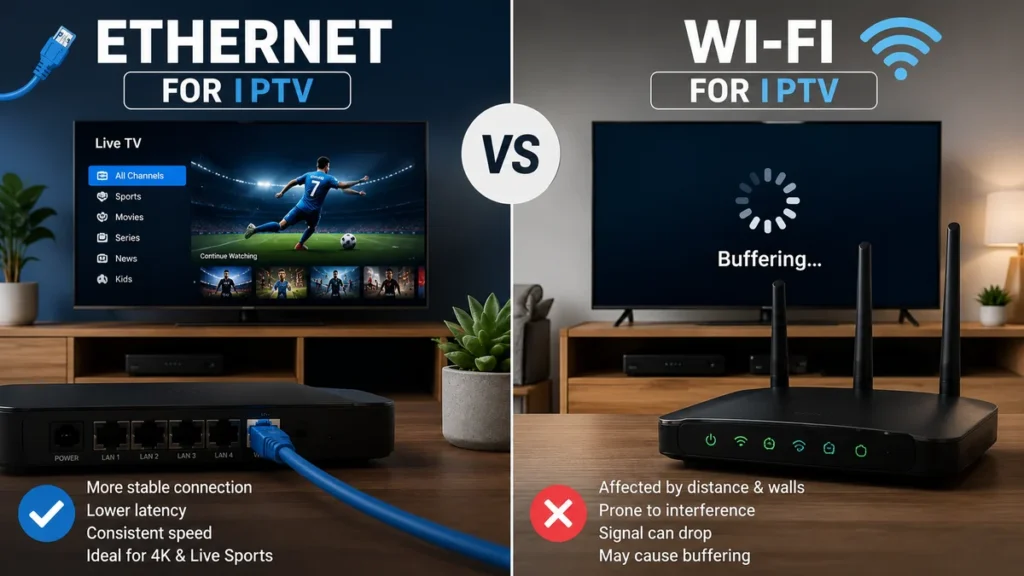
Choosing between Ethernet vs Wi-Fi for IPTV can have a major effect on streaming stability, picture quality and buffering.
Both connection types can work well, but they do not provide the same experience in every home. Ethernet creates a direct wired connection between the router and streaming device, while Wi-Fi sends the connection wirelessly through the home.
This guide compares Ethernet and Wi-Fi for IPTV users in South Africa and explains which option may be better for your Smart TV, Android TV box, Fire TV device or other streaming equipment.
What Is the Difference Between Ethernet and Wi-Fi?
Ethernet and Wi-Fi both connect your streaming device to the internet, but they use different methods.
Ethernet
Ethernet uses a physical network cable connected between the router and the television or streaming device.
The cable carries internet data directly to the device without relying on a wireless signal.
Wi-Fi
Wi-Fi connects the device to the router wirelessly.
It is more convenient because no cable is required, but performance can be affected by distance, walls, interference and router placement.
Why the Connection Type Matters for IPTV
IPTV sends video continuously through your internet connection.
Unlike loading a normal webpage, live television needs a stable flow of data. Short connection drops can cause:
- Buffering
- Freezing
- Picture-quality reduction
- Audio interruptions
- Channels taking longer to open
- The stream disconnecting completely
A fast connection is useful, but consistency is equally important.
A stable 20 Mbps connection may provide a better experience than a 100 Mbps connection that repeatedly drops or changes speed.
Is Ethernet Better Than Wi-Fi for IPTV?
Ethernet is generally the more stable connection for IPTV because it creates a direct link between the router and streaming device.
It is less affected by:
- Distance inside the room
- Thick walls
- Nearby wireless networks
- Household electronic interference
- Weak Wi-Fi coverage
- Incorrect router placement
Ethernet is especially useful for live sport, Full HD and 4K streaming, where frequent connection changes can be more noticeable.
However, Ethernet is not always practical. The router may be in another room, the device may not have a network port or running a cable across the home may be difficult.
Advantages of Ethernet for IPTV
More Consistent Connection
A wired connection normally remains more consistent because the signal travels directly through the cable.
This can reduce short connection drops that may not appear during a basic speed test.
Lower Risk of Wireless Interference
Ethernet is not affected by neighbouring Wi-Fi networks, microwave ovens, thick walls or wireless congestion in the same way as Wi-Fi.
Better for Live Sport
Live sport often uses high-resolution video and fast movement.
A stable connection helps maintain picture quality during important moments without frequent buffering.
Useful for 4K Streaming
4K video requires more bandwidth than standard-definition or HD content.
Ethernet can help deliver a more consistent connection when your internet package and streaming device support the required quality.
Read our guide about internet speed for 4K streaming before selecting the highest resolution.
Predictable Performance
An Ethernet connection is generally less affected by someone walking between the router and television or closing a door between rooms.
Disadvantages of Ethernet
A Cable Is Required
You need a physical cable running between the router and device.
This may be inconvenient when they are located in different rooms.
Not Every Device Has an Ethernet Port
Some streaming sticks, phones and tablets do not include a built-in Ethernet connection.
A compatible adapter may be required, and not every adapter provides the same performance.
Cable Management
Long cables can look untidy or create a trip hazard when they are not installed carefully.
Run cables along walls, behind furniture or through safe cable channels where possible.
Advantages of Wi-Fi for IPTV
Easy to Set Up
Wi-Fi normally requires only the network name and password.
You do not need to connect or hide a physical cable.
Flexible Device Placement
The television or streaming device can be moved without changing the cable installation.
Useful for Mobile Devices
Phones, tablets and laptops are designed to use wireless connections and may not have Ethernet ports.
Suitable When the Router Is Nearby
A strong Wi-Fi connection in the same room as the television can provide smooth IPTV streaming.
Many households may not notice a major difference between Ethernet and strong Wi-Fi during normal HD viewing.
Disadvantages of Wi-Fi
Signal Strength Changes With Distance
The farther the device is from the router, the weaker the signal may become.
Walls Can Reduce Performance
Concrete, brick, metal and multiple walls can reduce wireless coverage.
Wireless Congestion
Nearby networks and household devices may use the same wireless channels.
This can make Wi-Fi performance less consistent, particularly in apartments and densely populated areas.
Router Placement Matters
A router hidden inside a cabinet or placed in a far corner may provide poor coverage even when your internet package is fast.
Read our complete guide about Wi-Fi router placement for IPTV to improve the wireless signal.
When Wi-Fi Is Good Enough for IPTV
Wi-Fi may provide excellent IPTV performance when:
- The router is in the same room as the streaming device.
- The wireless signal is strong.
- The home has limited interference.
- You use a modern router.
- The device supports 5 GHz Wi-Fi.
- Few devices are downloading at the same time.
- The selected video quality matches the available connection.
Do not assume that Wi-Fi is automatically unreliable. A well-positioned router and strong signal can provide smooth streaming.
When You Should Use Ethernet
Found the Best Connection for Your IPTV Setup?
If Ethernet or Wi-Fi is now working reliably on your Smart TV, compare the available IPTV plans and choose the option that best matches your home network and viewing needs.
Ethernet is worth testing when:
- IPTV frequently buffers on Wi-Fi.
- The television is close enough to the router for a cable.
- You regularly watch live sport.
- You stream Full HD or 4K content.
- The Wi-Fi signal must pass through several walls.
- The home has many connected devices.
- Your Wi-Fi speed changes throughout the day.
- The television keeps disconnecting from the network.
Testing Ethernet can help determine whether buffering is caused by the wireless connection.
How to Connect a Smart TV With Ethernet
Most Smart TVs include a network port on the back or side of the television.
- Turn off the television if necessary.
- Connect one end of the Ethernet cable to the router.
- Connect the other end to the network port on the television.
- Turn on the television.
- Open Network or Connection settings.
- Select Wired Connection or Ethernet.
- Wait for the connection test to finish.
Some televisions automatically switch to Ethernet when the cable is connected.
Open an IPTV channel and allow it to play for several minutes to test stability.
How to Connect an Android TV Box With Ethernet
Many Android TV boxes include a built-in Ethernet port.
- Connect the box to the television.
- Connect the Ethernet cable between the router and box.
- Open Settings.
- Select Network and Internet.
- Choose Ethernet or Wired Network.
- Confirm that the connection is active.
When the box does not include a network port, a compatible USB Ethernet adapter may be an option.
Confirm that the adapter supports your specific device before purchasing it.
Can You Use Ethernet With a Fire TV Stick?
A Fire TV Stick does not normally include a built-in Ethernet port.
A compatible Ethernet adapter can connect the device to a wired network.
The typical setup includes:
- The Fire TV Stick
- A compatible Ethernet adapter
- A power connection
- An Ethernet cable connected to the router
Check device and adapter compatibility carefully because available ports and power requirements may differ between models.
Can You Use Ethernet With a Phone or Tablet?
Some Android phones and tablets can use Ethernet through a compatible USB adapter.
However, Wi-Fi is normally more convenient for mobile devices.
A wired connection may be useful for testing or for a fixed tablet setup, but it reduces mobility.
2.4 GHz vs 5 GHz Wi-Fi for IPTV
When using Wi-Fi, the selected wireless band can affect performance.
2.4 GHz Wi-Fi
The 2.4 GHz band normally provides greater range and may pass through walls more effectively.
It can be useful when the streaming device is located farther from the router.
However, it is often more congested because many household devices use the same band.
5 GHz Wi-Fi
The 5 GHz band can provide faster performance and may experience less congestion.
It is often the better choice when the device is close to the router.
Its effective range is generally shorter, and the signal may weaken more quickly through walls.
Which Band Should You Choose?
Test both bands on the actual streaming device.
Do not choose only according to the maximum speed. Select the connection that remains stable during several minutes of live streaming.
Wi-Fi 5 vs Wi-Fi 6 for IPTV
Both Wi-Fi 5 and Wi-Fi 6 can provide smooth IPTV streaming when the signal is strong and the home network is not overloaded.
Wi-Fi 6 can handle multiple connected devices more efficiently and may provide better performance in busy households with several phones, Smart TVs, computers and streaming devices using the same network.
- Wi-Fi 5: still suitable for HD and 4K streaming in many homes.
- Wi-Fi 6: useful for homes with many connected devices or heavier network traffic.
Upgrading the router is not always necessary. If your current Wi-Fi connection is stable, changing to Wi-Fi 6 may not create a noticeable difference for one IPTV stream.
How to Test Ethernet Against Wi-Fi
You can compare both connections without changing your internet package.
- Connect the streaming device to Wi-Fi.
- Run a speed test when possible.
- Open one live IPTV channel.
- Allow it to play for at least ten minutes.
- Test channel changes and on-demand content.
- Connect the same device through Ethernet.
- Repeat the same tests.
Compare:
- How quickly channels open
- Whether buffering occurs
- Picture quality
- Connection drops
- Performance during busy evening hours
Test under similar conditions for a fair comparison.
Does Ethernet Increase Internet Speed?
Ethernet does not increase the maximum speed supplied by your internet provider.
However, it can help the streaming device receive the available connection more consistently.
For example, your package may provide a fast connection at the router, but weak Wi-Fi may prevent the television from receiving the same performance.
Ethernet reduces the wireless part of the problem.
Does a Faster Ethernet Cable Improve IPTV?
For normal home IPTV streaming, the connection usually does not require an expensive specialist cable.
A properly working modern Ethernet cable is generally sufficient for a home fibre, LTE or 5G router connection.
Replace the cable when:
- The connector is damaged.
- The cable disconnects when moved.
- The television does not recognise the connection.
- The cable is visibly cut or crushed.
A premium cable will not solve an unstable internet service or a problem affecting the IPTV application.
Can a Long Ethernet Cable Reduce Performance?
A suitable Ethernet cable can normally cover the distances found inside a typical home without causing a noticeable problem.
A long cable may still create practical issues when it is:
- Damaged
- Poorly terminated
- Crushed under furniture
- Placed where people repeatedly step on it
- Connected through faulty adapters
Install the cable safely and avoid sharp bends.
What if the Router Is in Another Room?
When the router is too far away for a simple cable, consider these options:
- Use a longer Ethernet cable along the wall.
- Install a wired access point.
- Use a mesh Wi-Fi system.
- Move the router to a more central location.
- Use a properly positioned Wi-Fi extender.
- Ask a network installer about structured cabling.
Do not place a Wi-Fi extender directly inside the weakest area. It needs to receive a usable signal from the router.
Ethernet vs Mesh Wi-Fi for IPTV
A mesh system can improve wireless coverage in a larger home.
It is more convenient than running cables to every room, but a mesh connection still depends on wireless communication unless the points use Ethernet backhaul.
Ethernet remains the more direct connection, while mesh Wi-Fi provides greater flexibility.
A mesh system may be suitable when:
- The home has several floors.
- Multiple rooms need coverage.
- Running cables is difficult.
- Several mobile devices need stable Wi-Fi.
Why Ethernet Can Still Buffer
Using Ethernet does not guarantee that every IPTV problem will disappear.
Buffering can still be caused by:
- An unstable internet service
- Insufficient available bandwidth
- Several devices downloading at once
- A slow or overloaded streaming device
- An outdated IPTV player
- A temporary problem affecting one stream
- An expired or incorrectly configured account
When Ethernet does not improve the stream, continue troubleshooting the internet connection, device and application.
Use our complete IPTV buffering fix guide for additional steps.
How Other Devices Affect Ethernet and Wi-Fi
Both connections share the total internet bandwidth available to the home.
IPTV performance may decrease when other devices are:
- Downloading large games
- Streaming 4K video
- Uploading cloud backups
- Running video calls
- Installing system updates
- Downloading large files
Ethernet improves the connection between the router and streaming device, but it cannot create extra bandwidth beyond your internet package.
Recommended IPTV Connection by Room and Device
- Main Smart TV near the router: Ethernet is usually the best option.
- Smart TV in another room: Use strong 5 GHz Wi-Fi when available, or Ethernet if a cable can be installed safely.
- Fire TV Stick: Wi-Fi is convenient, while a compatible Ethernet adapter can improve stability.
- Android TV box: Ethernet is recommended when the box includes a network port.
- Phone or tablet: Wi-Fi is normally the most practical option.
- Large or multi-floor home: Consider mesh Wi-Fi or a wired access point if coverage is weak.
Quick Comparison: Ethernet vs Wi-Fi for IPTV
| Feature | Ethernet | Wi-Fi |
|---|---|---|
| Connection stability | Usually more consistent | Depends on signal strength |
| Installation | Requires a cable | Wireless and convenient |
| Distance and walls | Less affected | Can reduce performance |
| Mobility | Limited by cable | Easy to move devices |
| Live sport and 4K | Often preferred | Works well with a strong signal |
| Mobile devices | May require an adapter | Normally the practical choice |
Which Connection Should South African Households Choose?
Choose Ethernet when stability is your main priority and the router can be connected safely to the television or streaming device.
Choose Wi-Fi when convenience and mobility are more important and the signal is strong enough for the selected video quality.
Many households can use both:
- Ethernet for the main Smart TV
- Wi-Fi for phones and tablets
- Wi-Fi for secondary televisions
- Ethernet for live sport and 4K viewing
The best option is the one that remains stable in your actual home environment.
Frequently Asked Questions
Is Ethernet always better than Wi-Fi for IPTV?
Ethernet is generally more consistent, but strong modern Wi-Fi can also provide smooth IPTV streaming.
Will Ethernet stop all buffering?
No. It can solve buffering caused by weak Wi-Fi, but it cannot fix every internet, device, application or stream problem.
Is Wi-Fi fast enough for 4K IPTV?
It can be when the signal is strong, the router is suitable and enough bandwidth is available. Ethernet may provide greater consistency.
Should I use 2.4 GHz or 5 GHz?
Use 5 GHz when the device is close to the router. Test 2.4 GHz when the device is farther away or behind several walls.
Can I connect a Fire TV Stick with Ethernet?
Yes, when you use a compatible Ethernet adapter designed for the device.
Does Ethernet use less internet data?
No. The amount of data used depends mainly on the stream quality and viewing time, not whether the connection is wired or wireless.
Why is Wi-Fi fast on my phone but slow on my television?
The television may have a weaker wireless receiver, be located farther from the router or be positioned behind walls and furniture.
Should I buy a new router or use Ethernet?
Test Ethernet first when possible. It can show whether weak Wi-Fi is the main problem before you purchase a new router.
Your Home Network Is Ready — Choose Your IPTV Plan
Once your Smart TV has a stable Ethernet or Wi-Fi connection, the next step is to compare IPTV plans and choose the subscription that fits your device, internet connection and viewing habits.
Final Thoughts
When comparing Ethernet vs Wi-Fi for IPTV, Ethernet normally provides the most consistent connection, particularly for live sport, Full HD and 4K streaming.
Wi-Fi remains a convenient and effective choice when the router is well positioned and the streaming device receives a strong signal.
Start by testing both connections on the same device. Allow a live channel to play for several minutes and compare buffering, channel-loading time and picture quality.
For the main television, use Ethernet whenever it is practical. For phones, tablets and devices in other rooms, optimise the Wi-Fi network and select the band that provides the most stable performance.
Visit Prime IPTV SA for more IPTV setup, streaming and home-network guides for viewers in South Africa.