

Streaming made simple for South African homes
IPTV South Africa for Live TV, Sports & Movies
IPTV South Africa gives you a simple way to watch live TV, sports, movies and series on compatible Smart TVs, Android TV, Fire TV, phones, tablets and computers. Start with a 24-hour trial, check your device and internet connection, then compare available IPTV plans in South Africa.
Trial before a longer plan
Smart TV and streaming devices
South Africa setup guidance
Browse city-specific setup information for IPTV Johannesburg. We also provide general guidance for Cape Town, Durban, Pretoria, Gqeberha.
21,000+Live TV channels
100,000+Movies and series
HD & 4KStreaming options
All DevicesCompatibility guidance
24/7Customer support
24 HoursTrial option
Movies and series
Popular Entertainment Viewers Are Searching For
Explore well-known movies and television series in a smooth automatic carousel. Titles are shown as entertainment examples; availability depends on the provider, region and licensing.
Entertainment and device guides are available for IPTV Cape Town. We also provide general guidance for Durban, Pretoria, Gqeberha, Bloemfontein.

Oppenheimer

Godzilla x Kong

Kung Fu Panda 4

The Fall Guy

Civil War

The Last of Us

Fallout

House of the Dragon

Shōgun

Wednesday

Stranger Things
 Poster images are supplied through TMDB. This website is not endorsed or certified by TMDB. View TMDB.
A complete entertainment experience
IPTV South Africa Built for Everyday Streaming
IPTV South Africa gives viewers a flexible way to watch live television, sports, movies and series through an internet connection. Instead of depending on one television point in the house, you can use a compatible Smart TV, streaming box, phone, tablet or computer. The goal is simple: choose a supported device, install a suitable player, test your connection and start watching through one organised interface.
A good home setup should be easy to understand before you subscribe. Check which app is available for your device, confirm whether your Wi-Fi is stable in the room where you watch, and use a trial to review picture quality and navigation. This helps you avoid choosing a long plan before you know how the service performs on your own network.
Live TV and Sports with IPTV South Africa
Follow live events, news and general entertainment from one channel guide. Sports viewers should test important events during peak hours and use Ethernet when possible for a steadier connection.
Movies and Series on IPTV South Africa
Browse on-demand categories without switching between several devices. Search tools, favourites and viewing history depend on the player you choose, so select an app that is comfortable for your household.
Family Entertainment with IPTV South Africa
Use language, country and category filters to find suitable programmes. Parents should review player controls and organise favourites so younger viewers can reach approved content more easily.
Simple activation process
How to Start with IPTV South Africa
Getting started should not require complicated technical work. Follow these three steps and keep your device information ready when you contact support.
1
Choose a Device and Player
Decide where you want to watch and confirm which compatible app is available. Android TV and Fire TV devices usually offer several player choices, while Smart TV availability depends on the model and app store.
2
Request a Trial
Test the service on the same internet connection and device you plan to use every day. Check live playback, on-demand navigation, audio, subtitles and the categories that matter to your household.
3
Select a Plan and Activate
After the trial, choose the subscription period that suits you. Save the activation message in a secure place and contact support before changing apps or resetting your device.
Local streaming guidance
IPTV South Africa for Homes Across the Country
Streaming conditions are not identical in every area. Fibre is common in many urban neighbourhoods, while fixed LTE and 5G remain practical where fibre is unavailable. Test the service in the room where you watch, especially during busy evening hours.
Our city pages help households compare device compatibility, connection stability and setup steps before selecting a longer plan.
Open detailed local pages for IPTV Durban. We also provide general guidance for Pretoria, Gqeberha, Bloemfontein, East London.
Durban
Test live playback during evening peak periods and compare Wi-Fi with a wired connection.
Read Durban guide →Pretoria
Confirm app availability on the exact Smart TV, Fire TV or Android TV model before ordering.
Gqeberha
Review Wi-Fi coverage and device compatibility for homes across Nelson Mandela Bay.
Bloemfontein
Compare fibre, LTE and device options before choosing a longer subscription period.
East London
Test the connection beside the main television and during normal viewing hours.
Subscription Pricing
Choose the IPTV Plan That Fits Your Viewing
Not sure which subscription period is right for you? Start with our IPTV free trial in South Africa guide to test compatibility first, then read our guide to comparing IPTV suppliers before choosing a longer plan.
Free Trial
24-Hour Trial
Duration: 24 Hours
R0
+34.000 TV Channels
+260.000 Movies & Series
4K / Ultra HD Picture Quality
Premium Sports channels
Dstv, Netflix, Prime, HBO, Disney & More
Catch Up / EPG For All Channels
Daily Updates
99.9% Server Uptime
All Devices are Supported
AntiFreeze Technology
24/7 Technical Assistance
Standard 1-Month
Duration: 1 Month
R180
+34.000 TV Channels
+260.000 Movies & Series
4K / Ultra HD Picture Quality
Premium Sports channels
Dstv, Netflix, Prime, HBO, Disney & More
Catch Up / EPG For All Channels
Daily Updates
99.9% Server Uptime
All Devices are Supported
AntiFreeze Technology
24/7 Technical Assistance
Popular
Order on WhatsApp
Premium 3-Month
Duration: 3 Months
R319
+34.000 TV Channels
+260.000 Movies & Series
4K / Ultra HD Picture Quality
Premium Sports channels
Dstv, Netflix, Prime, HBO, Disney & More
Catch Up / EPG For All Channels
Daily Updates
99.9% Server Uptime
All Devices are Supported
AntiFreeze Technology
24/7 Technical Assistance
Best Value
Order on WhatsApp
Elite 12-Month
Duration: 12 Months
R814
+34.000 TV Channels
+260.000 Movies & Series
4K / Ultra HD Picture Quality
Premium Sports channels
Dstv, Netflix, Prime, HBO, Disney & More
Catch Up / EPG For All Channels
Daily Updates
99.9% Server Uptime
All Devices are Supported
AntiFreeze Technology
24/7 Technical Assistance
⚡
Instant Auto Setup
M3U lists and Xtream credentials compiled within 1 hour after payment check.
🛡️
No Locked Contracts
Manual reloads. We never save card files or trigger automatic debit traps.
🤝
Free 24h Inspection
Try our SuperSport UHD zapping speed first for absolutely free. Zero risk.
Device compatibility
Watch on the Devices You Already Use
Our setup guidance covers popular streaming devices and operating systems. The exact app may vary by device, so check compatibility before purchasing a long-term plan.
Device-specific local pages are available for IPTV Gqeberha. We also provide general guidance for Bloemfontein, East London, Polokwane, Mbombela.
Smart TV
Samsung and LG models with a compatible player
Fire TV
Fire TV Stick and Fire TV devices
Android TV
Google TV, Android boxes and media players
Apple Devices
Apple TV, iPhone and iPad apps
Mobile
Android phones and tablets
Computer
Windows and macOS compatible players
Connection checklist
Internet Speed Guide for Smooth Streaming
Streaming quality depends on the stability of your connection, not only the advertised speed. Ethernet or 5 GHz Wi-Fi usually gives a more consistent result than a crowded 2.4 GHz network.
Connection tips are included in our pages for IPTV Bloemfontein. We also provide general guidance for East London, Polokwane, Mbombela, Kimberley.
- Run the speed test beside the television or streaming device.
- Pause large downloads and cloud backups while testing.
- Use Ethernet for major live events whenever possible.
Standard viewing
10+ Mbps
A practical starting point for one HD stream on a stable connection.
Full HD comfort
20+ Mbps
More headroom for Full HD playback and normal household use.
4K and busy homes
25–50+ Mbps
Recommended when using 4K or sharing the connection with several devices.
Universal Setup Wiki
How to Set Up IPTV on Your Device
Choose your device below for a clear installation outline. Your activation message should include the login format and the details required by your selected player.
Follow setup guidance prepared for viewers in IPTV East London. We also provide general guidance for Polokwane, Mbombela, Kimberley, Johannesburg.
Local SA Network Recommendation
For ultimate 4K streaming during big sports events (like Currie Cup / Premiership soccer), we recommend connecting your device via an Ethernet LAN cable, or on a 5GHz Wi-Fi channel rather than standard 2.4GHz.
Helpful answers
Frequently Asked Questions About IPTV South Africa
Read the answers below before requesting a trial. They cover devices, internet speed, setup, support and account usage.
You can also open city-specific answers for IPTV Polokwane. We also provide general guidance for Mbombela, Kimberley, Johannesburg, Cape Town.
What is IPTV and how does it work?
IPTV delivers television and on-demand video through an internet connection instead of a traditional satellite or cable signal. You normally sign in through a compatible player on a Smart TV, streaming box, phone, tablet or computer.
Which devices can I use?
Common options include Android TV, Google TV, Amazon Fire TV, selected Samsung and LG Smart TVs, Apple TV, Android phones, iPhone, tablets, Windows computers and macOS devices. App availability can differ by model and region.
What internet speed should I have?
A stable connection is more important than a high headline speed. As a practical starting point, allow roughly 10 Mbps for HD and 25 Mbps or more for 4K on each active stream, with extra capacity for other devices using the same network.
Can I test the service before choosing a plan?
Use the trial option to confirm that your device, player and internet connection work well together. Test the channels and content categories that matter most to you before selecting a longer plan.
Is IPTV legal to use in South Africa?
Yes, IPTV technology itself can be used legally in South Africa. What matters is whether the provider has the necessary rights to distribute the channels, movies, sports and other content offered through the service. Always choose a transparent provider and avoid services that offer copyrighted premium content without clear authorisation. Read our guide answering is IPTV legal in South Africa? for more details.
What should I do if streaming buffers?
Restart the router and streaming device, close large downloads, test Ethernet or 5 GHz Wi-Fi and try another compatible player. If the issue continues, contact support with your device model, app name and connection type.
From the blog
Latest IPTV Setup Guides and Streaming Tips
Use the blog to publish device tutorials, troubleshooting advice and practical streaming guides. Each article can target a focused search question and link readers back to your plans, setup and FAQ sections.
Use the blog together with our local pages for IPTV Mbombela. We also provide general guidance for Kimberley, Johannesburg, Cape Town, Durban.
October 13, 2026
Smart IPTV App South Africa: Setup, Playlist Upload & Troubleshooting
Smart IPTV is a media player used on compatible televisions and streaming devices to organise and play authorised IPTV playlists. The application…
Read guide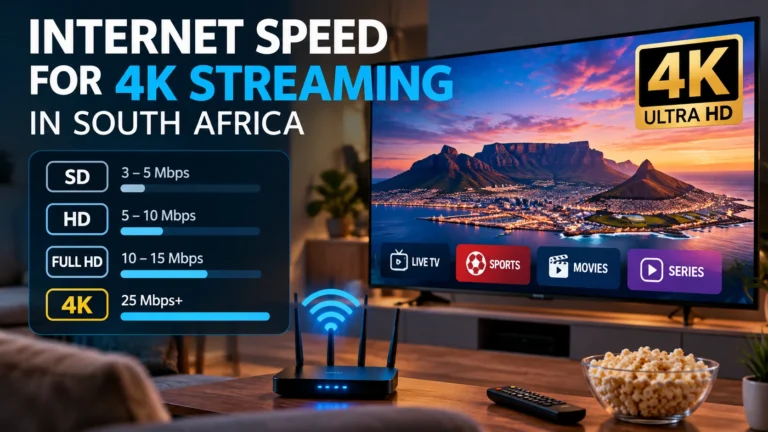
October 12, 2026
Internet Speed for 4K Streaming in South Africa: How Much Do You Need?
Internet Speed for 4K Streaming in South Africa: How Much Do You Need? Watching movies, live television and sports in 4K can…
Read guide
October 7, 2026
DEV IPTV Pro South Africa: Install, Setup & Fix Common Issues
DEV IPTV Pro South Africa: Install, Setup & Fix Common Issues DEV IPTV Pro is a media player that can be used…
Read guideReady to Test IPTV on Your Device?
Start with a short trial, check picture quality and device compatibility, then choose the subscription period that works for your household.
Start with the guide closest to your area: IPTV Kimberley. We also provide general guidance for Johannesburg, Cape Town, Durban, Pretoria.